Enable CUDA in an Existing C++ Project in Visual Studio
Recently I needed to integrate CUDA into a C++ project in Visual Studio. Since the project was not created using the NVIDIA CUDA template, I had to manually configure the environment.
Environment
- IDE: Visual Studio 2017 Professional
- CUDA Driver Version: 573.92
- CUDA Toolkit Version: 12.4
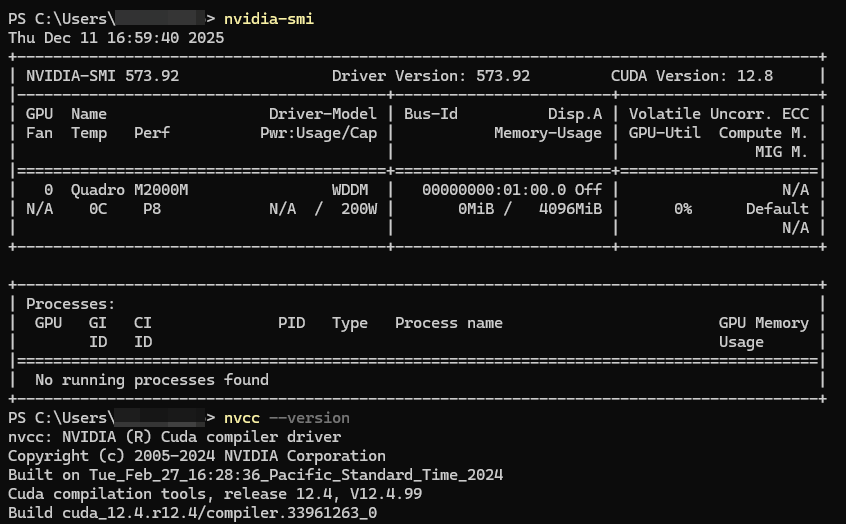
1. Enable Build Customizations
- Right click the project -> Build Dependencies -> Build Customizations...
- Check the box for CUDA 12.4.
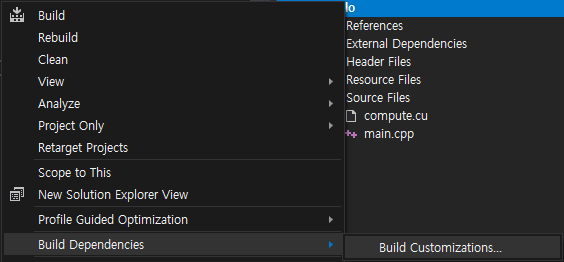
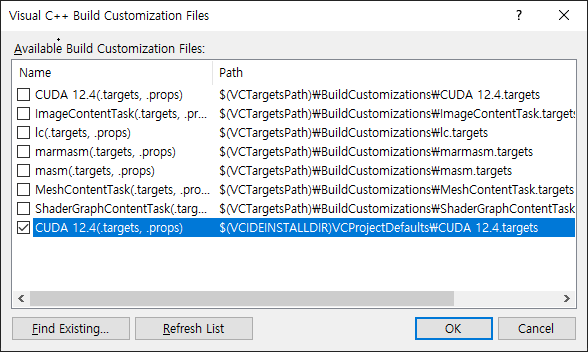
Typically, Visual Studio automatically detects the CUDA customization files (see first CUDA 12.4 in the image above).
If not, you need to manually copy all files from
C:\Program Files\NVIDIA GPU Computing Toolkit\CUDA\v12.4\extras\visual_studio_integration\MSBuildExtensionsto
C:\Program Files (x86)\Microsoft Visual Studio\2017\Professional\Common7\IDE\VC\VCProjectDefaultsThis will make the CUDA customization option available in the list (see second CUDA 12.4 above).
2. Add Linker Dependencies
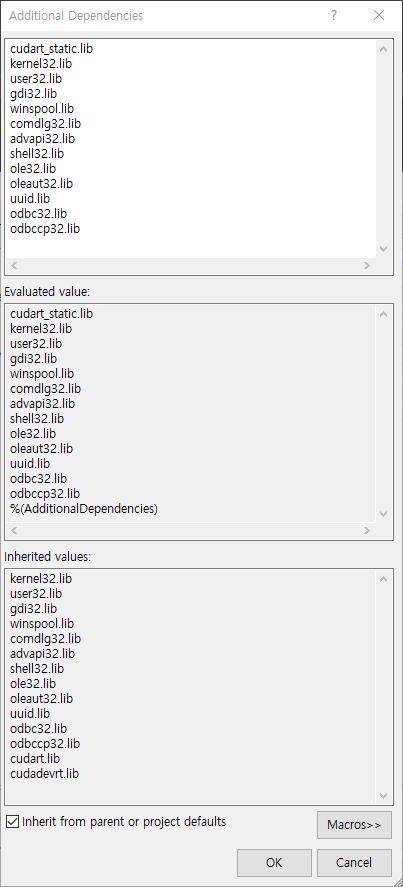
Go to Project -> Properties -> Linker -> Input -> Additional Dependencies, then add the following libraries.
cudart_static.lib
kernel32.lib
user32.lib
gdi32.lib
winspool.lib
comdlg32.lib
advapi32.lib
shell32.lib
ole32.lib
oleaut32.lib
uuid.lib
odbc32.lib
odbccp32.lib
3. Let's Test
Create main.cpp and compute.cu in an empty project with following code.
// main.cpp
#include <iostream>
#include <vector>
#include <chrono>

extern "C" void runCudaAdd(float *a, float *b, int n, int iters);

void cpuAdd(float *a, float *b, int n, int iters)
{
    for (int k = 0; k < iters; k++)
        for (int i = 0; i < n; i++)
            a[i] += b[i];
}

int main()
{
    const int N = 50'000'000;
    const int ITERS = 100;

    std::vector<float> a(N, 1.0f);
    std::vector<float> b(N, 2.0f);

    std::cout << "Start computation\n";

    // CPU
    auto cpuStart = std::chrono::high_resolution_clock::now();
    cpuAdd(a.data(), b.data(), N, ITERS);
    auto cpuEnd = std::chrono::high_resolution_clock::now();
    std::cout << "CPU: "
        << std::chrono::duration<double, std::milli>(cpuEnd - cpuStart).count()
        << " ms\n";

    std::fill(a.begin(), a.end(), 1.0f);

    // GPU
    auto gpuStart = std::chrono::high_resolution_clock::now();
    runCudaAdd(a.data(), b.data(), N, ITERS);
    auto gpuEnd = std::chrono::high_resolution_clock::now();
    std::cout << "GPU: "
        << std::chrono::duration<double, std::milli>(gpuEnd - gpuStart).count()
        << " ms\n";

    return 0;
}
// compute.cu
#include <cuda_runtime.h>
extern "C" void runCudaAdd(float *a, float *b, int n, int iters);
__global__ void addKernel(float *a, float *b, int n, int iters)
{
int idx = blockDim.x * blockIdx.x + threadIdx.x;
if (idx >= n) return;
for (int i = 0; i < iters; i++)
a[idx] += b[idx];
}
extern "C" void runCudaAdd(float *a, float *b, int n, int iters)
{
float *d_a, *d_b;
size_t size = n * sizeof(float);
cudaMalloc(&d_a, size);
cudaMalloc(&d_b, size);
cudaMemcpy(d_a, a, size, cudaMemcpyHostToDevice);
cudaMemcpy(d_b, b, size, cudaMemcpyHostToDevice);
int threads = 256;
int blocks = (n + threads - 1) / threads;
addKernel <<<blocks, threads>>> (d_a, d_b, n, iters);
cudaDeviceSynchronize();
cudaMemcpy(a, d_a, size, cudaMemcpyDeviceToHost);
cudaFree(d_a);
cudaFree(d_b);
}Then right click *.cpp / *.cu -> Properties -> General -> Item Type: Ensure it is set to C/C++ compiler for *.cpp and CUDA C/C++ for *.cu.
Compile and run the code. The output should be
Start computation
CPU: 1349.78 ms
GPU: 232.134 ms
References
https://docs.nvidia.com/deeplearning/cudnn/backend/latest/reference/support-matrix.html