Build Linux kernel from source
Host: Debian 12.10. Target Kernel Version: 5.10.168.
1. Install Tools for Building Kernel
apt update
apt install git fakeroot build-essential ncurses-dev \
    xz-utils libssl-dev bc flex libelf-dev bison dwarves
2. Download the Kernel Source
Kernel source archives follow this URL pattern:
https://cdn.kernel.org/pub/linux/kernel/v<major_version>.x/linux-<full_version>.tar.xzFor version 5.10.168:
wget https://cdn.kernel.org/pub/linux/kernel/v5.x/linux-5.10.168.tar.xz
tar xf linux-5.10.168.tar.xz && cd linux-5.10.168
3. Configure and Build
The kernel config enables debug symbols by default, which can increase module sizes extremely (for me 1.1 GB with debug info and 54 MB without). If you don't need to develop or debug the kernel, it's best to disable these.
# copy current config as template
cp -v /boot/config-$(uname -r) .config
Run make menuconfig to uncheck the debug info option.
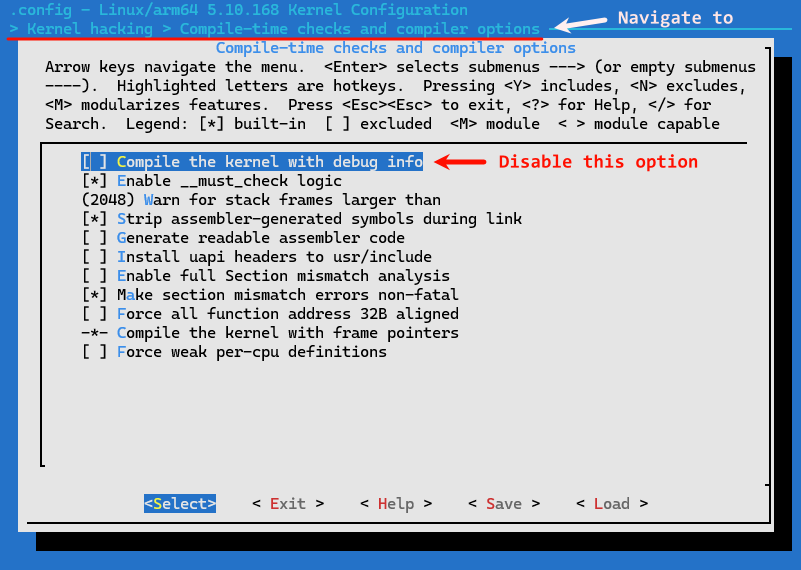
Or just disable it in .config.
CONFIG_DEBUG_INFO=nThen, start compilation.
make -j`nproc`Install modules and kernel files.
make modules_install
make install
4. Use New Kernel
Edit the GRUB settings in /etc/default/grub to select the custom kernel from boot. The kernel name can be found in /boot/grub/grub.cfg.
# change GRUB_DEFAULT=0 to point to the new kernel
GRUB_DEFAULT="Advanced options for Debian GNU/Linux>Debian GNU/Linux, with Linux 5.10.168"
Update GRUB and reboot.
update-grub
reboot
Use uname -r to verify the kernel version after reboot.

5. Use Custom Kernel on Other Hosts
Package kernel related files.
# 1. Package the modules
tar czf 5.10.168.tar.gz /usr/lib/modules/5.10.168
# 2. Package the kernel files in /boot
tar czf kernel.tar.gz /boot/initrd.img-5.10.168 /boot/vmlinuz-5.10.168 /boot/System.map-5.10.168 /boot/config-5.10.168
Then copy and decompress them to the same paths on the target host, update the GRUB settings in /etc/default/grub and run update-grub to apply the changes, and then reboot. The new kernel should be ready to use if everything is OK.